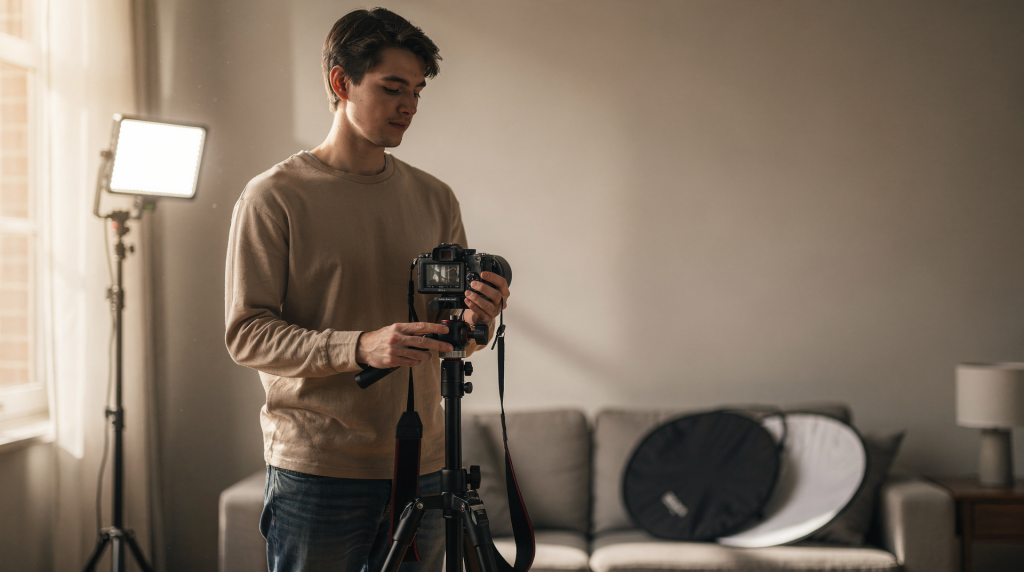
A cinematic look is never the result of a gear list. It comes from deliberate choices—how you shape light, when you move the camera, what you include in the frame, and how consistently those decisions repeat from shot to shot. A phone, a basic DSLR, or a modest mirrorless setup can all deliver footage that feels polished and intentional. The difference lies in the discipline behind the tools.
For architectural and real estate work, the bar is even higher. The video must sell a space without making it look artificial. Spaces need to feel authentic, not staged. That means your equipment can remain simple, but your method must be precise.
What “cinematic” actually means
A cinematic video isn’t just shallow depth of field or smooth motion. When you strip away the buzzwords, it usually carries four qualities:
- Clear visual intention
- Controlled motion
- Consistent lighting and color
- Shots that reveal information in a purposeful sequence
In practical terms, cinematic footage feels designed rather than simply recorded. Every frame answers a question: why is the camera here, and why does it move now? For architectural work, that question becomes even heavier. A room shouldn’t just be shown; it should be experienced—its proportions, the way light falls across a stone floor, the gentle invitation of an open doorway.
Start with the gear you already have
A full production kit isn’t the starting line. A lean setup often works better because it forces selectivity. When you can’t throw more equipment at a problem, you learn to solve it with observation and intent.
Minimum useful setup
- Camera or smartphone with manual controls
- One stable support, such as a tripod
- One small LED light or reflector
- A way to cleanly record audio if anyone speaks
- A wide lens, if available
For interiors, a wide-angle lens often matters far more than a fancy camera body. It’s the tool that communicates layout and spatial relationships—precisely the story an architectural video needs to tell. Even a smartphone’s built‑in wide lens, combined with a steady tripod, can capture the true volume of a room.
What matters most
Here is the priority order I recommend when resources are tight:
| Priority | What it affects | Why it matters |
|---|---|---|
| Light | Image quality and mood | Bad light makes even expensive gear look cheap |
| Stability | Perceived professionalism | Shaky footage breaks the cinematic feel instantly |
| Composition | Visual clarity | Clean framing makes small setups look deliberate |
| Movement | Emotional tone | Movement should support the space, not distract from it |
| Sound | Viewer trust | Poor audio makes the whole video feel unfinished |
If the budget forces a choice, invest first in stability and light before chasing better camera specs. A sturdy tripod and a single controllable light source transform what a modest camera can do.
Build the look with light, not gear
Light does the heavy lifting in cinematic video. A simple camera in well‑shaped light will almost always outperform a high‑end body in flat, uncontrolled conditions. For interiors, light defines not just exposure but atmosphere: the gentle gradient across a wall, the crisp shadow line from a window mullion, the warmth of a reading corner.
Use available light first
Before you touch any artificial source, let the room work for you. Open every curtain, blind, and shutter. In real estate and architecture, bright spaces naturally read as larger and more inviting; dark corners shrink the perception of volume.
Practical rules:
- Open every curtain and blind
- Turn on all usable interior lights
- Shoot during the softest available daylight when possible
- Avoid strong backlight unless you can shape it with diffusion or fill
Mix natural and artificial light carefully
A window lights one side of a room beautifully, but it also creates deep shadows opposite. That’s when a small LED panel, a practical lamp, or a reflector becomes invaluable. The aim isn’t to flood the space; it’s to balance it—so the eye moves naturally from brightness to shadow without hitting black holes.
Habits picked up on hundreds of interior shoots:
- Place lights farther from walls to soften falloff and avoid hot spots
- Diffuse hard LEDs with a softbox, white cloth, or bounce card
- Match color temperature so the room doesn’t look patchy—warm lamps against cold daylight can kill an otherwise beautiful frame
- Turn off mixed-color bulbs when they clash badly, unless the clash is a deliberate narrative choice
Lighting mistakes to avoid
- Framing a bright window directly behind a subject—it turns the interior into a silhouette
- Using harsh overhead light as the only source, flattening all texture
- Mixing warm lamps with cold LEDs without control, creating a confused color palette
- Overlighting a room until it loses depth and character
- Letting mirrors or glossy surfaces flare uncontrollably, pulling the eye away from the architecture
A room looks more cinematic when light has shape. Controlled contrast—where shadows still hold detail—feels more polished than uniform brightness. That’s especially true for materials like timber, brick, or stone, where side light reveals grain and texture.
Camera movement: less, slower, better
One of the fastest ways to make footage feel amateur is to move the camera without a reason. In architectural work, movement should reveal space, connect one area to another, or emphasize a design feature. Without that purpose, keep the camera still.
The best low-equipment camera moves
- Slow push-ins using a tripod head, a slider, or your body shifting weight
- Gentle pans that reveal a second subject or an adjacent room
- Slow lateral moves through doorways, guiding the viewer along a sightline
- Static shots broken up by subtle motion in the scene—curtains stirring, a plant leaf turning
- Locked-off frames with intentional foreground elements that add depth
These moves are easy to execute and easy to control. They also suit architectural work because they respect the geometry of the space. A slow track along a facade, for instance, lets the rhythm of windows and columns speak without the camera itself becoming the story.
A simple movement rule
If the shot doesn’t gain information from motion, keep it static. That single rule saves time, improves consistency, and prevents the common trap of adding movement just because the shot feels empty.
How to move the camera without a gimbal
- Keep movement slow enough that you can repeat it precisely
- Start and end each move on a static frame—this makes editing cleaner
- Use your knees and hips to absorb shake, not your arms alone
- Move the camera along straight lines whenever possible, following architectural lines
- Practice the move at least twice before recording the final take
A tripod can do far more than many beginners realize. With a fluid head, it creates elegant pans, tilts, and subtle push-ins that feel controlled rather than mechanical. Even a slow, deliberate handheld walk—knees flexed, arms close to the body—can yield a smooth reveal when post‑stabilized lightly.
Compose for architecture, not just for aesthetics
When filming spaces, composition must communicate scale, flow, and purpose. A pretty frame isn’t enough; it has to explain how the room lives and how one area leads to the next.
Frame with structure in mind
Good architectural composition usually does three things:
- Shows how one space connects to another
- Gives the viewer a reliable sense of scale
- Highlights the design logic of the room
Useful framing habits:
- Keep vertical lines straight—converging parallels instantly cheapen an interior shot
- Use doorways and hallways as natural frames, layering depth from the foreground inward
- Include foreground elements (a chair edge, a countertop, a plant) to create dimensionality
- Leave enough breathing room around key features so they anchor the composition
- Avoid cluttered compositions that hide the room’s structure
Think in layers
A cinematic frame often has a clear foreground, middle ground, and background. That layering adds richness even when your gear is modest. For example: a detail of a wooden balustrade in front, the living area beyond, and a window framing the garden in the back. The eye moves through the space, understanding depth without any elaborate lens effects.
Example setup: Foreground—a doorway jamb or a sofa arm. Middle ground—the main seating arrangement. Background—windows or a feature wall. That simple structure makes the image feel dimensional, no expensive glass required.
Shoot with a clear sequence, not random coverage
A cinematic video needs rhythm. Random shots produce noise; sequenced shots create flow. When you walk a property, you naturally experience it in a narrative order—approach, entry, discovery, detail, exit. That same sequence works for the camera.
A practical shooting order for spaces
- Exterior establishing shot
- Entry or threshold shot (the front door opening, stepping into the foyer)
- Wide room overview
- Detail shot (texture, material, decor)
- Transition to the next space
- Hero angle for the strongest feature
- Closing shot that leaves a clean final impression
This structure mirrors how people naturally read a building. It works for real estate, interiors, and location‑based storytelling, giving the edit a built‑in spine.
What to capture in each room
For every space, aim to collect:
- One wide shot that establishes the volume
- One movement shot that directs attention
- One detail shot that celebrates materiality
- One angle that explains function
- One shot that links the room to the next area (a doorway, a sightline)
That small shot list gives enough coverage to build an edit without overshooting. The discipline saves time on set and in post, while ensuring you don’t miss the architectural clues that give a space its character.
Use sound to make the footage feel expensive
Even a visually driven video is anchored by sound. Clean audio changes the perceived quality instantly. For architectural work, sound places the viewer inside the space—the echo of footsteps on a marble floor, the soft click of a latch, the subtle hum of a neighborhood through an open window.
What to record
- Room tone (30 seconds of “silence” in each space)
- Footsteps on different surfaces
- Door movement—openings, closings, latch clicks
- Natural ambience (birds, distant traffic, wind through trees)
- Any spoken explanation or interview audio
Ambient sound helps a space feel inhabited. A perfectly quiet room can feel sterile on video; a room with subtle natural sound feels real.
Keep audio simple
With basic gear, focus on:
- Recording in a quiet room with minimal echo
- Getting the microphone close to the source
- Avoiding hard reflections by using soft furnishings as dampeners
- Using a lav mic or a small shotgun mic if available
For architectural and real estate videos, clean sound doesn’t need to be flashy—it just needs to feel believable.
Edit for rhythm, not just for polish
A cinematic edit is usually restrained. It gives each shot enough time to breathe so the viewer can absorb the space. For architecture, rhythm is about letting the geometry and materials speak.
Edit guidelines
- Cut on motion when possible—the continuation of a pan or push‑in bridges the cut
- Avoid holding the same angle too long unless the details reward close study
- Use shorter clips for transitional shots, longer for your strongest frames
- Let room reveals happen gradually, not as fast succession
- Hold on the hero angle long enough to anchor the sequence
A common beginner mistake is overcutting. Fast cutting can hide weak shots, but it also destroys spatial continuity. For buildings and interiors, viewers need time to understand where they are and how the rooms relate.
Color correction basics
You don’t need a heavy grade. Start with correction to create consistency:
- Fix white balance so whites feel neutral
- Match exposure across shots
- Reduce extreme color casts (too much orange or green)
- Keep skin tones natural if people appear in frame
- Avoid crushed blacks and overblown highlights—keep texture in the extremes
Then, if the project calls for it, apply a light creative grade. For architecture, the best grade usually feels clean, balanced, and restrained, letting the materials and light define the mood. A slight lift in the midtones can open shadows without losing depth.
A simple low-equipment workflow
Here’s a practical workflow refined across countless small productions. It keeps you efficient and prevents the most common technical slip‑ups.
Pre-shoot checklist
- Clean the space and declutter surfaces
- Open all windows and blinds
- Turn on usable interior lights and check for flicker
- Remove distractions from the frame (cables, stray objects)
- Check for reflective surfaces and glare; plan camera angles accordingly
- Plan the room order so the narrative flows naturally
- Charge batteries and clear memory cards
On-set checklist
- Lock exposure and white balance when possible—use a grey card or a white wall to set it manually
- Keep vertical lines straight; use the camera’s level or a small bubble level
- Shoot each move at least twice for safety
- Watch for flicker from mixed lighting, especially cheap LEDs
- Review clips for shake and focus issues before moving on
- Capture extra room tone and detail shots—they cost nothing and save edits
Post-shoot checklist
- Organize clips by room in bins or folders
- Pick the strongest wide shot first and build the sequence around it
- Edit for space flow, not for speed
- Adjust color and exposure globally before fine‑tuning individual clips
- Watch the full cut without stopping to feel the rhythm
- Remove any shot that slows the story or repeats information
Common mistakes when working with limited equipment
1. Trying to imitate expensive productions too early
Big camera moves, aggressive grading, and complex lighting setups often look worse than a clean, simple rig handled well. Embrace the limits of your gear; they force a clarity that big productions can overlook.
2. Ignoring the room itself
No amount of gear fixes bad staging. Declutter, straighten furniture, and shape the space before you ever turn on the camera. A well‑prepared room photographs itself.
3. Moving too fast
Fast pans and shaky walk‑throughs create chaos. Slow movement reads as intentional and gives the viewer time to absorb the architecture.
4. Shooting everything wide and flat
Wide shots are necessary for context, but they aren’t enough. Details and transitions give the edit texture and reveal the craft of the space.
5. Mixing lighting temperatures carelessly
A room lit with a mix of daylight, tungsten, and random LEDs can look unprofessional in an instant. Choose one dominant temperature and supplement with matched sources.
A practical example: filming a small interior with minimal gear
Imagine a compact living room with a camera, a tripod, and one small LED panel. The window faces east, so soft morning light washes the main wall. Here’s how to turn that simple setup into a polished architectural sequence.
Step-by-step approach
- Open the curtains completely and turn on the practical lamps for warmth.
- Place the LED panel near the camera, bounced into the ceiling or a wall, to lift the shadow side without creating a second set of harsh shadows.
- Start with a static wide shot from the doorway, framing the room with verticals straight and the opening itself acting as a foreground layer.
- Make a slow push‑in toward the main seating area, letting the eye settle on the textures of the sofa and rug.
- Capture a detail shot of books, wood grain, or a textured cushion—this adds the tactile quality that sells a space.
- Pan gently toward the window, revealing the connection to the outdoors.
- Record room tone and a few natural sounds: the creak of a floorboard, the distant birdsong through the glass.
- In the edit, arrange the shots to move from entrance to feature to exit, holding on the hero angle long enough to imprint the room’s character.
That’s enough to create a result that feels thoughtful and professional, without a single large rig.
When to spend money and when not to
You don’t need to buy everything at once. Spend only when a specific limitation is genuinely blocking your results.
Worth upgrading first
- A stable tripod with a smooth fluid head—precision pays off in every frame
- One reliable LED light with adjustable color temperature
- A neutral‑density filter for bright exterior work, especially when you need to keep shutter speed under control
- An external microphone for clean, believable audio
- A wide lens with minimal distortion, if your current glass is too tight for interiors
Lower priority at the start
- Gimbals for every project—a tripod and deliberate movement often suffice
- Multiple lights you can’t yet control or power on location
- Expensive cinema bodies without a clear, practical need
- Specialty accessories that solve rare problems you haven’t yet encountered
A smart low‑budget setup isn’t about owning less; it’s about owning the few items you can actually use to their full potential.
Final checklist for cinematic footage on a small budget
- Light the space first, not just the subject
- Move the camera only with purpose
- Keep compositions clean and structural
- Capture wide, detail, and transition shots
- Prioritize stability over speed
- Match color and exposure across the edit
- Use sound to support realism and presence
- Edit with restraint—let the space breathe
FAQ
Can a phone create cinematic video?
Yes, if it offers decent manual control and you pair it with good light, stable framing, and deliberate movement. A modern smartphone on a tripod with controlled lighting can capture remarkably cinematic interiors.
Do I need a gimbal for cinematic footage?
No. A tripod, slow movement, and careful framing often produce a more controlled, architecture‑friendly result than a gimbal handled poorly. Gimbals are tools, not shortcuts.
What is the fastest way to improve a low‑budget video?
Improve the light and stabilize the camera. Those two changes usually deliver the biggest jump in perceived quality, far more than a sensor upgrade.
How do I make small rooms look better on video?
Use wide framing to expand the sense of space, bright but controlled light to keep shadows from closing in, clean staging to avoid visual clutter, and slow camera motion to let the room breathe. Avoid harsh shadows and over‑furnishing.
Should I always shoot in 24 fps?
Not always. Use the frame rate that fits the project and deliverable—24 fps gives a classic filmic cadence, but 25 fps or 30 fps might be required for broadcast. Whatever you choose, keep motion smooth and intentional.
Conclusion
Cinematic video with limited equipment isn’t about pretending to have a larger production. It’s about making precise, informed choices that turn simple tools into a coherent visual language. Control the light, move slowly and with purpose, compose for structure, and edit with restraint—and even a modest setup will produce footage that feels thoughtful, professional, and genuinely cinematic. In architectural filmmaking, where the space itself is the protagonist, that discipline transforms a room into a story worth watching.