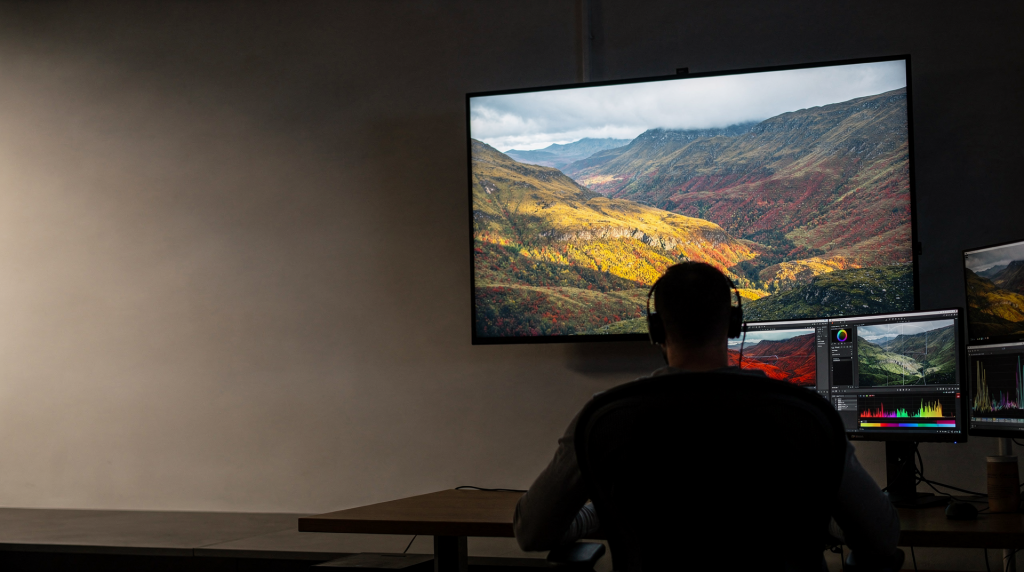
Color grading is where clean footage becomes intentional. It shapes mood, guides attention, and makes a scene feel polished instead of merely corrected. For cinematic video—especially real estate, architecture, and interior work—the goal is not to make everything look dramatic. It is to make the image feel cohesive, believable, and emotionally aligned with the space. A kitchen that looks warm and inviting, a concrete facade that reads as cool and precise, a historic hallway that holds its shadows without turning muddy: these impressions are built in the grade.
What color grading actually does
People often use “color correction” and “color grading” as if they mean the same thing. They are related, but they solve different problems.
- Color correction fixes technical issues like white balance, exposure, and unwanted color casts.
- Color grading creates the final look, such as a cooler modern feel, warm natural interiors, or deeper contrast for a moody exterior.
A useful way to think about it: correction makes the footage usable, grading makes it expressive. On an architectural shoot, that distinction matters because a space rarely arrives on set with perfect lighting. You correct the mixed color temperatures and uneven exposure first, then you grade to reinforce the atmosphere the designer or homeowner intended. The two stages feed each other, but treating them as one blurry step leads to clips that feel either technically clean but emotionally flat, or stylized but unstable.
Start with the right foundation
Before you push color around, the image needs a stable base. If the shot is poorly exposed or badly white-balanced, any creative grade will fight the footage instead of enhancing it. I have lost count of the times a beautiful room looked mediocre on the monitor because I rushed to add a teal-and-orange LUT before fixing the green tint on the walls. The grade only amplifies what is already there.
Check these basics first
- Exposure is consistent across the shot.
- Whites do not look yellow, green, or blue unless that is intentional.
- Blacks are not crushed so hard that detail disappears.
- The clip is not oversaturated before you begin.
- Skin tones, if present, look natural before stylization.
If you are grading architecture or interiors, this foundation matters even more. Walls, windows, flooring, and painted surfaces make color issues obvious very quickly. A slight magenta shift on white trim might go unnoticed in a lifestyle video, but in a luxury property film it jumps out like a neon sign. The camera sees more than the eye does, and the viewer’s eye is drawn to surfaces that should be neutral.
The core workflow for cinematic grading
A clean workflow keeps you from overworking the image. In most cases, this order is the most efficient.
- Balance exposure.
- Fix white balance.
- Set contrast.
- Adjust saturation.
- Refine with secondary corrections.
- Add a look only after the image is stable.
- Check the shot against other clips in the sequence.
This sequence reduces guesswork and helps you avoid the common beginner mistake of applying a LUT or “cinematic” preset too early. I follow this order on every architectural project, from compact condo walkthroughs to full exterior day-to-night transitions. When you correct first and grade second, each adjustment builds on a solid base, and you spend less time backtracking because a stylistic choice broke the exposure or shifted the neutrals.
Primary corrections: the technical base
Primary corrections affect the whole image. They are usually the first pass. In architectural work, these adjustments do most of the heavy lifting: a well-exposed room with clean white balance already looks professional even before any creative color is added.
Exposure
Exposure is about how bright the image feels overall. If the shot is too dark, your shadows may hide important detail like wood grain or upholstery texture. If it is too bright, highlights can look flat and lifeless, and any bright window becomes a featureless white rectangle.
Use exposure controls to:
- recover detail in bright windows,
- protect shadow texture in darker rooms,
- keep exterior skies from blowing out,
- make interior and exterior shots sit together more naturally.
I often set exposure with the waveform scope rather than the LCD. A kitchen with a large window can fool the eye: the monitor might show the room as bright because of the window, while the countertops are three stops under. Scopes tell the truth.
White balance
White balance controls whether the image feels warm, cool, or tinted green/magenta.
A practical rule:
- Warm interiors can feel inviting.
- Cooler tones can feel modern, clean, and architectural.
- A green cast often makes interiors look cheap or unflattering.
For interiors, white balance is one of the most important fixes because mixed lighting is common. Daylight from windows, tungsten practicals, and LED fixtures often fight each other. In one loft shoot, I had daylight spilling through a skylight, warm Edison bulbs over the island, and a cool LED strip under the cabinets. The raw footage looked like three different rooms. Correcting white balance meant choosing a neutral point that balanced the competing sources without making any area look alien. A slight warmth in the living area can coexist with a cooler kitchen as long as the overall frame feels intentional.
Contrast
Contrast gives the image shape. Without it, footage can look hazy and unfinished. Too much contrast, and you lose nuance in shadows and highlights—especially problematic in architecture where shadow detail often carries the texture of a material.
Good cinematic contrast usually preserves detail while creating separation between:
- dark areas,
- midtones,
- bright highlights.
That separation is what gives a shot depth. In a corridor with a bright window at the end, controlled contrast lets you keep the window visible and the walls from falling into pure black. The space feels dimensional rather than crushed.
Why scopes matter more than your monitor
Your monitor can lie to you. Scopes are more reliable because they measure the image instead of your screen’s calibration. A laptop display with a warm bias will make every shot look too orange, and you will overcorrect in the wrong direction. Scopes give you a consistent reference no matter where you are grading.
The three most useful scopes
| Scope | What it helps you see | Why it matters |
|---|---|---|
| Waveform | Brightness levels across the image | Helps set exposure and protect highlights |
| Parade | RGB balance across the frame | Helps spot color casts in shadows or highlights |
| Vectorscope | Saturation and color direction | Helps control oversaturation and skin tone shifts |
For cinematic grading, scopes are especially useful when cutting between spaces with different lighting conditions. A bright kitchen and a moody hallway may still need to feel like they belong in the same visual world. The waveform shows whether the hallway’s shadows are too deep compared to the kitchen’s midtones, and the parade can reveal a green tint in the hallway shadows that you would never notice by eye. Matching shots becomes a measurement, not a guess.
Secondary corrections: fixing specific parts of the image
Secondary corrections target one area instead of the full frame. This is where you fine-tune the shot. In architectural work, secondaries are often more valuable than a fancy look because they solve real-world problems: a window that is too bright, a wall that picked up a color cast from a nearby sofa, or a floor that looks too orange.
Common uses
- darken bright windows without affecting the whole room,
- correct a color cast on a wall,
- soften overly saturated foliage outside a window,
- keep skin tones natural while the rest of the shot feels stylized,
- separate a subject from the background.
For architectural and real estate work, secondaries are often more useful than dramatic looks. They help the space read clearly. I routinely isolate a window with a power window or qualifier to pull down its exposure by half a stop, leaving the interior untouched. That single move can turn a blown-out view into a balanced frame where the room and the exterior both feel present.
Keep secondaries subtle
The biggest mistake is making isolated adjustments obvious. If a correction looks “painted on,” the grade breaks.
A strong secondary correction should feel invisible. The viewer should notice the space, not the tool used to adjust it. When I mask a wall to remove a green tint, I feather the mask enough that the transition disappears, and I check the scopes to ensure no hard edge appears in the luminance. The goal is that the wall simply looks neutral, as if it was always that way.
Simple color principles that create a cinematic feel
You do not need extreme stylization to make video feel cinematic. In fact, restraint usually looks more expensive. A luxury condo does not need a heavy teal-and-orange wash; it needs clean whites, natural wood tones, and a balanced contrast that lets the architecture speak.
1. Control saturation
Overly saturated footage quickly looks digital and amateurish. Reduce saturation when colors compete for attention. A red accent chair should not scream louder than the room itself. I often pull global saturation down by 5–10% on interior shots, then selectively restore it where the design intentionally uses color.
2. Protect highlights
Harsh clipped highlights flatten windows, reflective surfaces, and bright walls. Soft highlight roll-off feels more natural and polished. In exterior shots, a slightly compressed sky keeps the building as the subject instead of a white void.
3. Keep shadows intentional
Deep shadows can add depth, but they should still hold texture when possible. A dark leather sofa should not become a black hole. Lift the shadows just enough to reveal material detail, especially on dark wood or stone.
4. Separate warm and cool tones
This contrast is one of the fastest ways to create dimension. For example:
- warm practical lights inside,
- cooler daylight outside.
This natural color temperature split gives a room a sense of place and time. It also helps the eye understand the light sources and the depth of the space.
5. Let neutral areas stay neutral
In architecture work, whites, grays, concrete, and wood tones need to look believable. If neutrals drift too far, the space starts feeling fake. A white wall that turns slightly blue because of a cool grade instantly reads as “video,” not as a real place. I use the parade scope to keep the RGB channels balanced on known neutral areas like trim or ceilings.
A practical grading workflow for cinematic video
Here is a simple workflow that works well for most footage. I use this on nearly every project, from quick real estate reels to full brand films for architects.
Step 1: Normalize the clip
If the footage is shot in a log or flat profile, bring it into a normal viewing range first. Do not grade a flat image as if it already looks finished. Apply a technical transform or manually adjust the curve so the image has natural contrast before creative work begins.
Step 2: Set exposure
Use the waveform to place shadows, mids, and highlights in a controlled range. Aim for no clipped highlights and no crushed shadows unless the scene demands it.
Step 3: Fix white balance
Remove unwanted color casts before adding style. Sample a neutral surface if possible, or use the parade to balance the RGB channels.
Step 4: Build contrast
Add shape without losing detail in windows, corners, or dark furniture. A gentle S-curve often works better than a heavy one for interiors.
Step 5: Adjust saturation carefully
Bring color up only as much as the shot needs. Watch the vectorscope to avoid oversaturation in wood tones or skin.
Step 6: Refine problem areas
Use masks, qualifiers, or power windows for specific fixes. This is where you fix the bright window or the color cast on a wall.
Step 7: Add the look
This is where you can create a more cinematic palette. Subtle film grain, a slight warm-cool split, or a gentle vignette can add mood without overpowering the space.
Step 8: Match adjacent shots
The grade should feel consistent across the scene, not reinvented from shot to shot. Compare each clip to a reference frame and make small adjustments so the sequence flows smoothly.
Example looks and when to use them
| Look | Best use case | Visual effect |
|---|---|---|
| Warm natural | Homes, hospitality, lifestyle spaces | Inviting, soft, human |
| Clean modern | High-end interiors, minimal architecture | Neutral, polished, controlled |
| Moody contrast | Historic buildings, dramatic exteriors, editorial pieces | Cinematic, atmospheric, elegant |
| Cool urban | Commercial spaces, glass towers, city shots | Sleek, contemporary, detached |
For real estate and architectural video, the look should support the property, not overpower it. A warm natural grade works well for a family home because it feels lived-in and welcoming. A clean modern grade suits a minimalist penthouse where the architecture itself is the star. The worst choice is a heavy “cinematic” teal-orange look on a bright suburban house—it feels disconnected from the space and the buyer’s expectations.
Common mistakes to avoid
Chasing presets
Presets are fine as a starting point, but they rarely fit a project perfectly. If you rely on them without adjusting, the footage can feel generic. I keep a few custom looks as starting points, but every project gets manual tweaks for white balance and contrast.
Over-cranking contrast
Too much contrast makes interiors look harsh and can hide design details that matter. A dark walnut floor and a black leather chair both disappear into shadow if you push the contrast too far. Use the waveform and pull back until you can see texture in both.
Making whites too white
Blasted whites remove texture from walls, ceilings, and trim. A white wall should not look like a pure 100% luminance block; it should have subtle variation and surface detail. Keep highlights below clipping and preserve the gentle roll-off.
Ignoring mixed lighting
A room lit by sunlight and practical bulbs can turn muddy if you do not balance each area carefully. The window area may be blue, the lamp area orange, and the shadows green. Secondary corrections are essential here. I often mask the window to cool it slightly and warm the interior to create a natural separation that still feels cohesive.
Forgetting the sequence
If you add a stylized look before fixing exposure and white balance, you will waste time trying to repair problems later. The order matters: correction first, grade second, match third. Reverse it and every clip becomes a separate battle.
A quick checklist before delivery
- Whites look neutral unless a tint is intentional.
- Shadows still hold detail.
- Window highlights are controlled.
- Saturation feels believable.
- Skin tones look natural.
- Adjacent shots match in tone and brightness.
- The grade supports the space instead of distracting from it.
I run through this list on every export. It catches the small issues—a slightly green shadow, an over-bright window, a shot that feels warmer than its neighbor—that clients might not articulate but will definitely notice.
Color grading tips for real estate and architectural video
Because this site focuses on spaces, here are a few practical priorities that matter in this niche.
Interiors
- Preserve wall color accuracy. A beige wall should not become yellow or gray.
- Balance daylight and practical lights carefully. Use secondary corrections to even out mixed temperatures.
- Keep wood tones rich but not overly orange. Oak floors should look like oak, not like a cartoon.
- Avoid making white walls gray or blue unless the design calls for it. Neutral interiors sell better when they feel clean and true.
Exteriors
- Control sky brightness so the building remains the subject. Use a soft highlight roll-off to keep clouds visible.
- Keep concrete, stone, and glass looking natural. These materials reflect surrounding colors, so watch for green tints from trees or blue tints from sky.
- Watch for shifts in reflected color from nearby buildings or trees. A glass facade next to a red brick wall may pick up a red cast that needs correction.
Detail shots
- Let texture survive in shadows and highlights. A close-up of a concrete wall should show grain, not flat gray.
- Use gentle contrast to emphasize materials like brass, wood, concrete, and fabric. A subtle S-curve can make brushed metal gleam without harsh clipping.
- Avoid heavy vignettes unless they serve the story. A strong vignette on a detail shot of a faucet might look stylish but can also feel distracting and artificial.
FAQ
What is the difference between color correction and color grading?
Color correction fixes technical problems like exposure and white balance. Color grading shapes the mood and final style of the image. Correction is about making the footage look right; grading is about making it look intentional.
Do I need LUTs to create a cinematic look?
No. LUTs can help, but they should not replace proper correction. A strong grade starts with balanced footage. A LUT applied to a poorly corrected clip will only amplify the problems.
What makes video look cinematic?
Usually it is a mix of controlled contrast, intentional color, natural saturation, and consistency across shots. It is less about heavy stylization and more about an image that feels deliberate and polished.
Should I grade every shot the same way?
No. Each shot should be balanced on its own, then matched to the rest of the sequence. Same look, different adjustments. A bright living room and a dim hallway need different exposure and shadow work to feel like they are part of the same film.
What is the most important thing to fix first?
Exposure and white balance. If those are wrong, everything else becomes harder. A well-exposed, neutral image is a blank canvas for creative choices.
Final thoughts
Good color grading is not about making footage flashy. It is about making the image feel intentional, coherent, and emotionally aligned with the subject.
For cinematic video, and especially for architecture and real estate work, the best grades are often the ones you barely notice. They make the space feel real, the light feel believable, and the story feel complete. A perfectly graded room feels like you could walk into it; the color does its job quietly, guiding your eye to the architecture, the materials, and the life within the space—never announcing itself.